

By Socialize, Doha
The POS for every food and drink venue
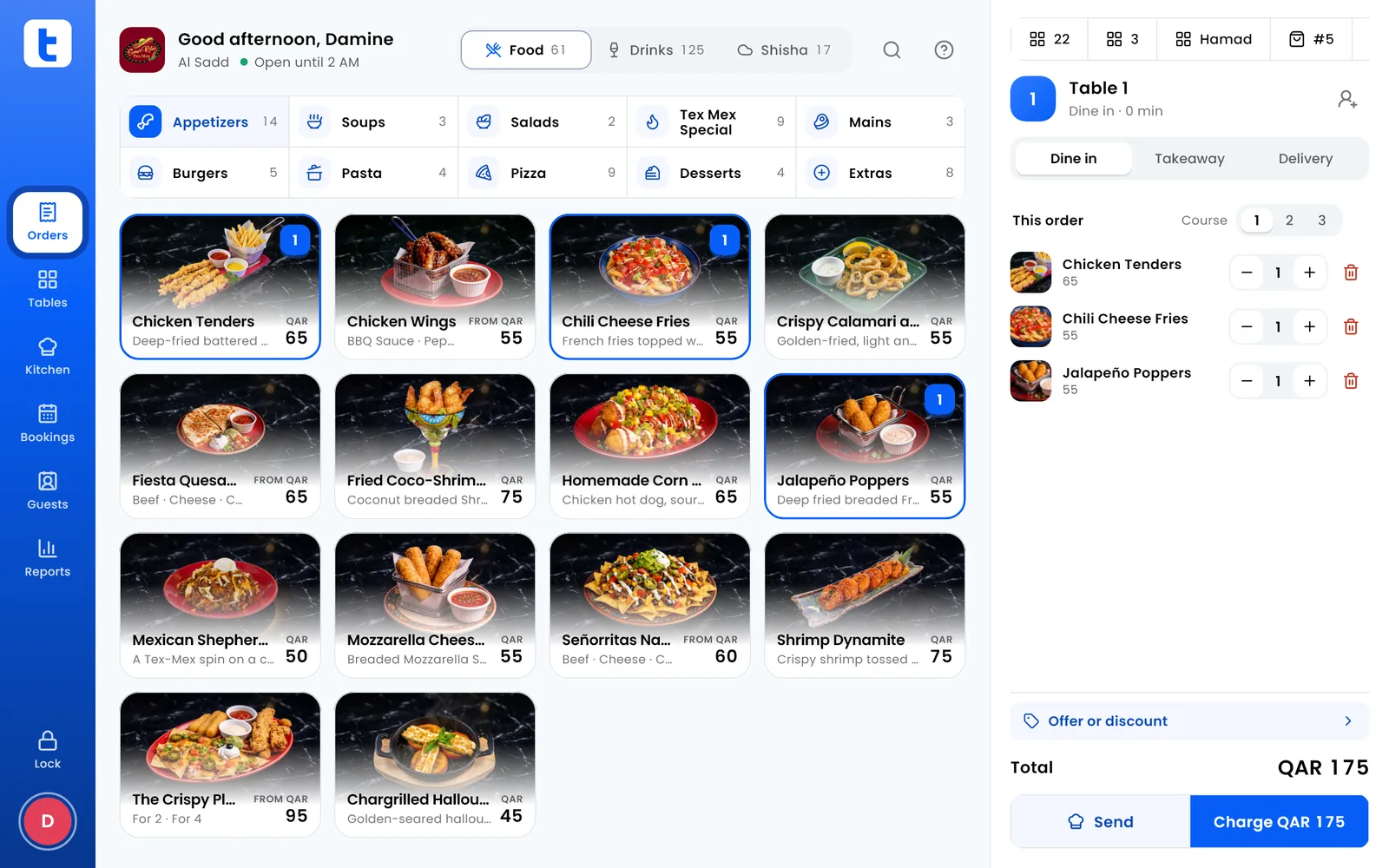
Take orders, run the kitchen screens, seat tables and bookings, count stock, pay your staff and read your reports. Delivery app orders land on the same POS, it keeps selling when the internet drops, and it speaks Arabic and English.
No card needed. The POS runs on Android and Windows, the back office in any browser.
What it does
One app for the counter, the kitchen and the office. Everything here works today.
Selling
Dine-in, takeaway and delivery from one screen. Split a bill by dish, equally or by amount, and add offers, tips and gift cards.
Payments
Cash, each card machine by name, Fawran or bank transfer, and your own ways, all on one bill. Card machines aren't linked yet: charge on the machine, then press it on the POS.
Kitchen and bar
Kitchen screens instead of paper. Each dish goes to its station, with timers, allergies flagged, courses held and fired, and the day's dish counts.
Tables and bookings
Your floor drawn to size, every table's state live, bookings and a waitlist, and a booking page for your guests.
Stock and recipes
Items, packs and recipes for each dish, counts, deliveries and waste, suppliers and orders. Every dish shows what it costs you.
Staff and payroll
A PIN and a role for each person, clock-ins, the week's shifts, and the month's pay with Qatar's WPS salary file, leave and gratuity.
Reports
The day so far and the close, sales by hour, dish and payment, every branch side by side, profit and loss, and a journal your accountant can import.
The owner's phone
Every branch's sales live on your Android phone, with every report, wherever you are.
Guests and loyalty
One guest book for all your branches, found by phone number. Loyalty points, tiers, and offers sent on WhatsApp.
Delivery apps
Talabat, Snoonu, Keeta and Deliveroo orders on the same POS as the rest, with each app's sales kept apart.
Works offline
Each POS saves every order on the device and keeps selling when the internet drops. It catches up as soon as the line is back.
Arabic and English
Every screen, menu, receipt and report in both languages. Switch whenever you like.
Plans
One price for each branch, a month. Every device is free, and every plan starts with 14 days free with everything open.
Start
Cafés, ice cream shops and small places
QAR 199
per branch, a month
or QAR 1,990 a year, 2 months free
In every plan:
- POS for dine-in, takeaway and delivery
- Kitchen screen
- Receipts
- Delivery apps
- Daily sales report
Pro
Restaurants and bars
QAR 349
per branch, a month
or QAR 3,490 a year, 2 months free
Everything in Start, and:
- Tables and bookings
- Stock and recipe costs
- Staff and shifts
- Loyalty
- Your own QR menu and online ordering
Smart
Groups that want to grow
QAR 549
per branch, a month
or QAR 5,490 a year, 2 months free
Everything in Pro, and:
- Guests known by their phone
- WhatsApp offers to guests
- Forecasts for busy days
- Alerts on your phone for missing money
- 14 days free with everything open. No card needed.
- Pay Socialize by bank transfer or Fawran, for a month or a year.
- Late payment never stops the POS. After 14 days unpaid the back office locks, and the POS keeps selling.
How it works
Six steps, and you can do every one of them yourself.
Sign up
Make an account in the back office with your email, and confirm it.
Make your venue
Its name, the kind of place it is, and your first branch.
Add your menu
Dishes, photos and prices, with names in Arabic and English.
Give staff their PINs
Each person signs in on the POS with a PIN, and has a role.
Connect your printers
Find your receipt and kitchen printers on the network, Bluetooth or USB.
Start selling
Take your first order. The reports fill in as you go.
Get Tablista
AndroidComing soon
WindowsComing soon
Back officeComing soon
Questions
Does Tablista work without the internet?
Yes. Each POS saves every order on the device and keeps taking orders and payments while the internet is down. When the line comes back, it sends what it saved and catches up with your other devices. The back office in your browser needs the internet.
Which devices does it run on?
The POS runs on Android tablets and phones and on Windows computers. The back office opens in any browser, and the owner's view works on an Android phone. There is no iPhone or iPad app yet. Google Play and the Windows download are coming soon; until then, write to us and we will set up your devices.
Is it in Arabic?
Yes. The POS, the menu, the receipts and the reports all work in Arabic and English, and you can switch at any time. The pages where your guests order and book come in both languages too.
How do I pay for Tablista?
By bank transfer or Fawran to Socialize, for a month or a year at a time. Pick your plan in the back office, send the payment with your venue's code as the reference, and mark it as sent. We confirm it, and your plan runs on from the end of the last one, so paying early loses no days.
How do my guests pay?
However they like. The POS records cash, each of your card machines by name, Fawran or bank transfer, gift cards and your own ways. Card machines are not linked to the POS yet: you charge the card on the machine, then press the same way on the POS.
What happens if I pay late?
The POS never stops selling. When a plan ends unpaid, you have 14 days to pay. After that the back office locks until the payment arrives, and every POS keeps taking orders and payments as usual.
Who owns my data?
You do. Your menu, sales, guests and staff are kept on your devices and in our database, and each venue sees only its own. You can download your reports as a PDF or a spreadsheet at any time. Our privacy policy says what we keep and why.
Can I cancel?
Yes, and there is no fixed term. Pay a month at a time and stop whenever you like: your plan runs to the end of what you paid for.